
Tempo Zero Jobs: the app that extends Business Central standard job order features
Tempo Zero Jobs
Tempo Zero Jobs per Microsoft Dynamics 365 Business Central, is the APP that meets the needs of businesses working to order.
Does your company work to order and do you need to manage the budgeting, costing and revenues about your projects?
Do you need to have an overall management of the job order extended to the different business areas with versatile and easy-to-use features?
Your answer in Tempo Zero Jobs! it contains a range of features that extend standard job order management to the Assembly and Manufacturing areas within the ERP.

Tempo Zero JOBS: additional features in your ERP
Manufacturing and Assembly
Within Tempo Zero Jobs, users can use jobs features in areas such as manufacturing and assembly and have a range of tools available to speed up the creation of related replenishment and shipping documents.
JOB CARDS
All the entries made by selecting jobs and tasks (such as purchases, sales, consumption, resource time entries) will flow costs and revenues directly into the archives and the job card will become the point where its progress can be precisely controlled.
Assigning Tasks
Tempo Zero Jobs makes it possible to assign default tasks to:
- specific items,
- work centres,
- production areas,
so that costing and processing times are automatically allocated and split.
Project Management
The job order features already available in the system have been enhanced.
The concept of a project quote has been introduced to manage the quoting phase, with the option to convert it later into a project order.
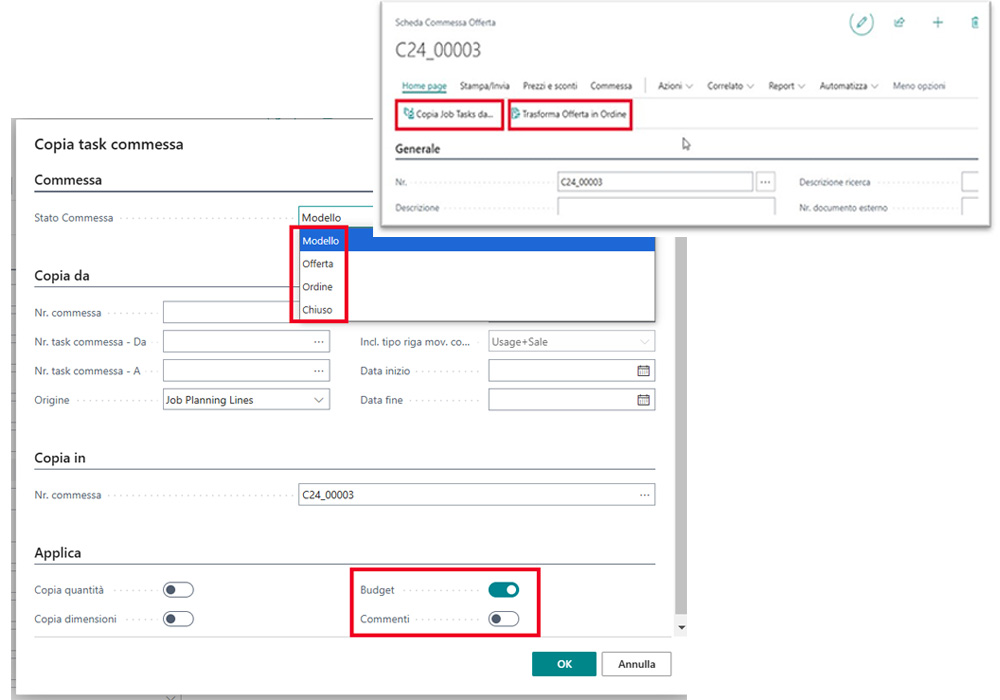
There are also dedicated screenshots for the different phases (quote, proposal, order) and a feature for copying tasks along with their corresponding budget lines from one project to another, speeding up project kickoff and ensuring a higher level of standardization.
Budget Management
A dedicated page for managing the project budget has been implemented, allowing you to plan costs and activities in detail.
Within this page, you can create and save different versions for comparison and “certify” the final one, automatically converting it into a schedule and thereby eliminating the need for external spreadsheets.
Logistics
A new “Order Type” field has been added, allowing you to assign a specific location code to each project.
This change allows you to create a specific warehouse location for each project, enabling precise management of materials purchased on an ad hoc basis.
Shipping Management
You can now create shipments for projects using “open delivery notes.”
This new tool allows you to ship both in-stock and out-of-stock items, while also managing the traceability of serial numbers and lots.
Statistics
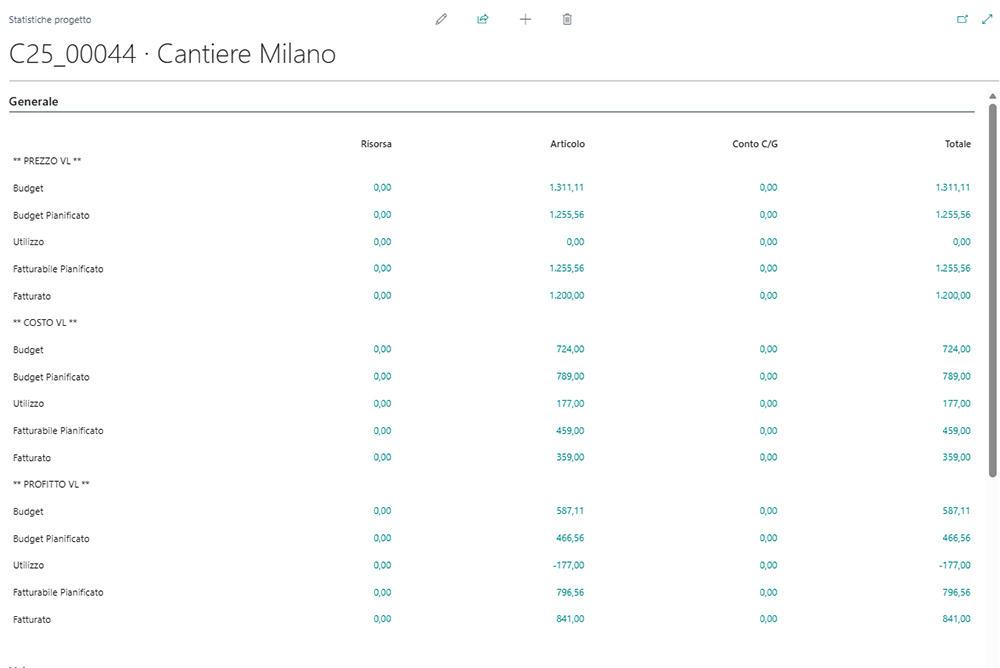
To provide immediate, visual proof of the project’s financial status, the “Statistics” screen has been enhanced.
It now includes data from the new budget table, showing a direct comparison between budget, planned and final values, allowing you to make decisions based on real data.
Integrated and automatic invoicing
To streamline the entire invoicing process and quicken cash flow, you can now generate invoices directly from project summary data (hours, materials, expenses).
Specific procedures have also been added to invoice shipments made using “free shipping notes,” ensuring that every project item is invoiced quickly and accurately.
Tempo Zero Jobs: screenshots
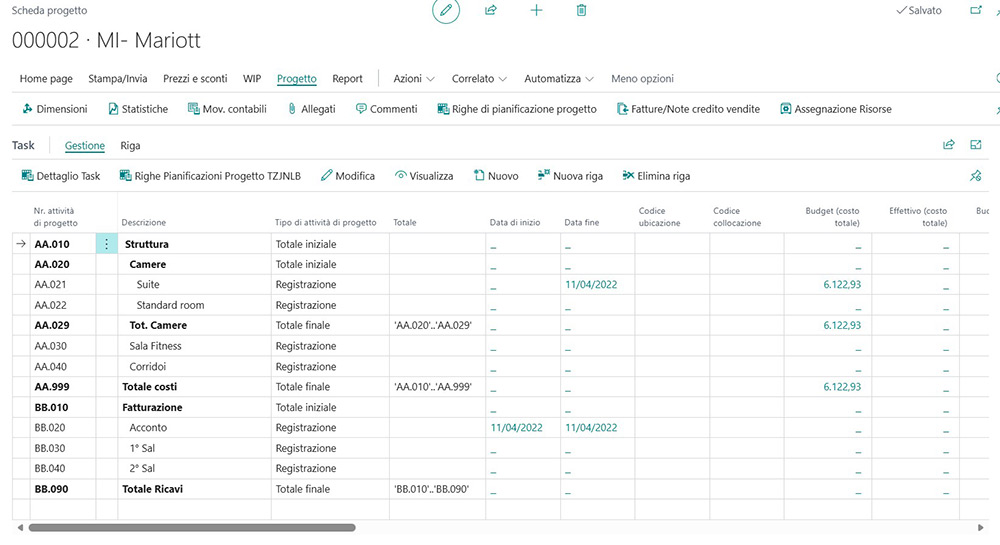
Job order form with cost data from the purchasing, assembly and production ledger
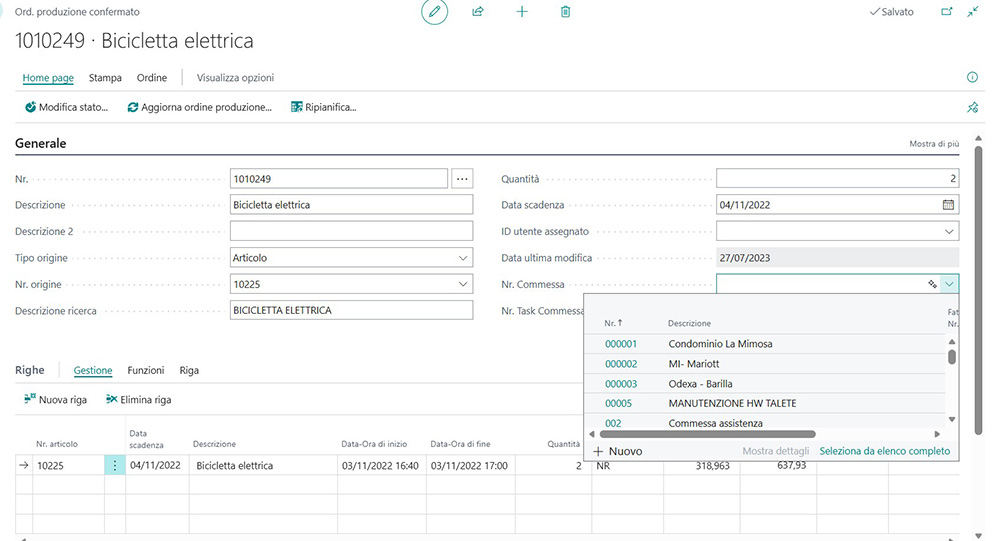
Production order with the option to select a job order
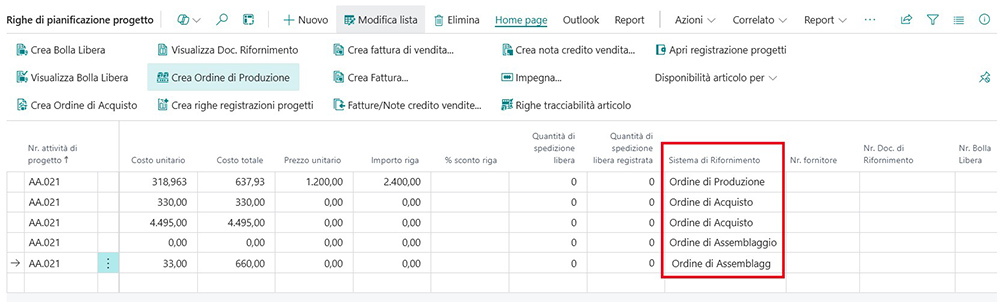
Order planning lines to generate procurement and shipping documents

For each planning line, you can specify the procurement method
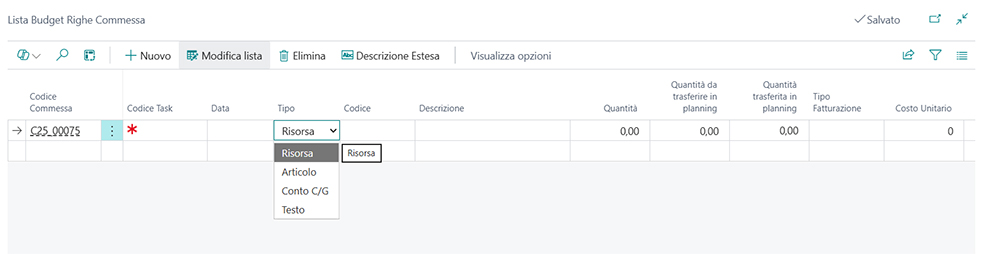
Project Budget Management
When you access a project budget, the budget header screen will open, displaying various budget details, including: Job No., Version, Cost Amount (the sum of the total cost for each budget line), Sales Amount (the sum of the total price for each budget line), Margin (Cost Amount – Sales Amount), and Margin% (Margin / Sales Amount)

Project Budget Management
The budget lines show the following details: Order Code, Task Code (order activity code), Date, Code (code of an item, resource, or accounting account), Quantity, Billing Type, Unit Cost, Unit Price, % Discount on Cost and Price, Budgeted Sales Amount, Budgeted Cost Amount, Supplier No. (if it is a purchase item, you can begin selecting the supplier, which will be reported on the planning lines and from which the Purchase Order will then be created. It is automatically inherited from the item), Quantity to be posted, posted quantity, Transferred to planning.
Projects Offers
Quotation-type projects are set up exactly like open projects, with the difference that you cannot define planning lines for them; you can only define the budget, the project header, and the tasks.
Quote projects can be converted into projects using the “Convert Quote to Order” function.
You can generate a project identical (in terms of header, tasks, and budget) to the quote (after assigning the project to an actual, rather than a potential, customer) that has been modified to allow filtering by project type and enables you to copy budgets and comments.
FREE SHIPPING DOCUMENTS

STATISTICS
All inquiries regarding orders must be made on the order statistics page. You can find it in the project tab by clicking the “Statistics” button.

CONTACT NAV-LAB
You will be contacted by our specialists in Microsoft ERP and the Tempo Zero suite of apps. Our consultants are available to provide insights on content, features, usage modes for the benefit of your company, and for a personalized demo.
ACTIVATE THE APP NOW
To activate the app, you need to contact NAV-lab for cost information and support regarding the download and implementation.
It’s also necessary to subscribe to the corresponding online service contract on a monthly or annual basis (SaaS – Software as a Service).
The service cost varies based on the number of users